
Product evidence
Test the difficult format and the normal range. A change that fixes one container may destabilise another.
Evidence-led fault finding
Record the exact symptom, establish a safe condition and separate product, mechanical, sensor, control and drive causes before changing settings or components.

Safe diagnostic sequence
Intermittent faults are often lost when products are removed, sensors are moved or VFD settings are changed without evidence. Capture time, format, load, speed, zone occupancy, alarms, signal states and exact location first. Follow the approved safe-isolation and access method before inspecting dangerous parts or carrying out maintenance.
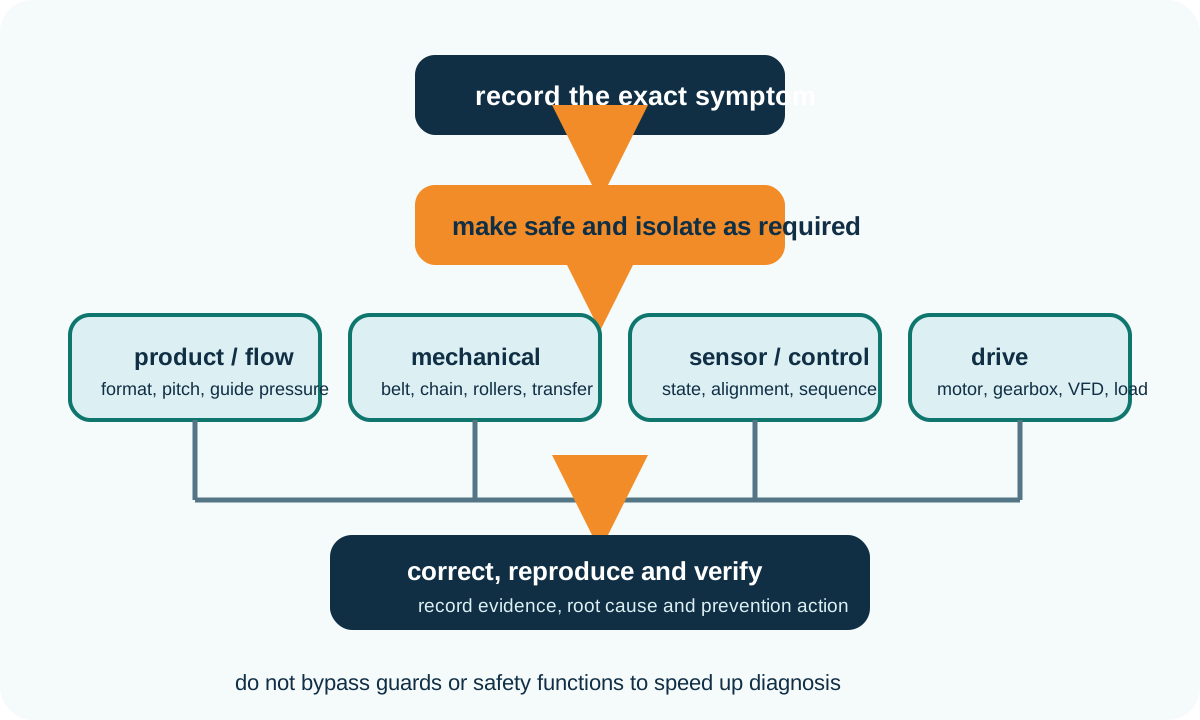
HSE maintenance guidance emphasises stopping moving plant, isolating electrical and other energy sources, locking off where necessary and considering stored energy before maintenance. Apply the site procedure and competent risk assessment to the actual equipment. Read HSE maintenance guidance.
Symptom matrix
| Symptom | Evidence to collect | Possible areas to inspect |
|---|---|---|
| Products jam or tip at one point | Exact format, orientation, speed, guide contact, gap and event immediately before the jam. | Transfer support, height mismatch, guide transition, sensor timing, acceleration and product base. |
| Belt moves sideways | Direction and time to drift, loaded position, contamination, tension and recent maintenance. | Frame and pulley alignment, loading symmetry, belt condition, tension, side force and debris. |
| Product slips or stalls | Load, incline, surface condition, acceleration, belt or chain speed and contamination. | Traction, belt selection, cleats, guide pressure, drive torque, tension and product contact area. |
| Drive or VFD trips | Fault code, current, speed, start condition, load distribution, temperature and frequency of occurrence. | Mechanical obstruction, loaded start, acceleration, motor/gearbox duty, wiring, parameters and cooling. |
| Sensor misses or false-triggers | Product colour, transparency, label, angle, gap, ambient light, vibration and displayed input state. | Sensor technology, mounting, background, contamination, sensitivity, timing and cable or I/O condition. |
| Accumulation will not release | Zone occupancy, blocked signal, product spacing, controller mode and downstream ready state. | Sensor state, zone logic, communications, release timing, mechanical drag and product bridging. |
Downloadable fault record
The blank record includes product or format, operating mode, symptom, alarm or signal state, location, immediate safe action, root cause, corrective action and verification result. Add photographs, video, trend data or component measurements using a referenced evidence number.
Download conveyor fault record
Use the sensor and controls guide for signal faults, the drive selection guide for trip conditions and the product transfer problem page for jams and tipping.
Verification
Confirm the root cause under the condition that previously produced the fault. Repeat starts, stops, transfer, accumulation and changeover as relevant. Check that the action has not created a new problem elsewhere, such as excessive guide pressure, unsafe access, over-sensitive sensing or a drive condition outside approved limits. Update drawings, settings, inspection tasks and spare-parts records when the correction changes the controlled equipment state.
Test the difficult format and the normal range. A change that fixes one container may destabilise another.
Record alignment, tension, wear, contamination or damaged parts before and after correction rather than relying on visual memory.
Save alarm history, I/O states, parameter or software revision and the verified sequence. Keep safety-related changes under competent control.
Buyer questions
Higher speed changes acceleration, product spacing, transfer time, sensor response and available recovery time. Record which variable crosses the failure threshold instead of assuming the motor is the cause.
The load may be off-centre, a transfer may apply side force, the frame may deflect or contamination may change friction. Inspect the complete loaded path.
Not before checking technology, target, background, alignment, contamination and timing. Excess sensitivity can create false detections and unstable control.
No. Record the fault code and operating condition, then identify whether the cause is mechanical, electrical, thermal, parameter-related or a mismatch between drive duty and load.
Provide the exact symptom, product, operating mode, speed, alarm code, I/O state, recent changes, photographs or video and a repeatable sequence.
Follow the site’s safe-use procedure. Equipment should not continue where guarding, safety functions, structural condition, drive integrity or other defects create an unacceptable risk.
Project review
Provide product format, operating state, alarm history, photographs or video and the conditions that reproduce the problem for technical review.
Belt-specific diagnosis
The point where a belt finally touches a frame may be downstream of the cause. Compare empty and loaded running at fixed observation stations, record side loading and contamination, and preserve the original setting before one justified change is tested.
Use the conveyor belt tracking guide for a dedicated observation map, symptom matrix and downloadable tracking record.